

| What I need to use IPi Phone? |
| You must have microphone and headphones or speakers. Recommended is sound card with full duplex support. You should be connected to internet or LAN. Minimal connection speed is 28.8 on modem. If you do not have a microphone, you can still listen, but not talk. |
| Does IPi Phone run on Windows XP or Windows Vista? |
| Supported are all 32bit versions of MS Windows (XP/Vista/7 ). |
| How can I know IP address of opposite? |
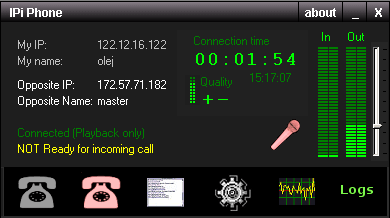
IPi Phone doesn’t use any central server. It means, that you must type IP address of opposite directly to connection dialog. When you start IPi Phone, your IP address is displayed on top left corner. You must deliver IP address to opposite if he wants to call you. 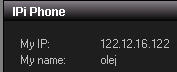 Use left mouse click on IP address and it will be copied to clipboard. Use left mouse click on IP address and it will be copied to clipboard. |
| Is IPi Phone compatible with another IP2IP software? |
| No, IPi Phone is not compatible with IP2IP software. It uses own protocol based on TCP. All connected users should use IPi Phone. |
| Why should I register? |
| IPi Phone is released as shareware, allowing you to test it for a limited 30 days period. If you plan to continue using the program, you are required to register. |
| What happened to user if fail to register after 30 day trial period? |
| IPi Phone is after few minutes automatically terminated. User can enter registration number. |
| Are there some limitations during trial period? |
| There is limited connection time. |
| I have installed IPi Phone. What do I do now? |
| You can start IPi Phone, exchange you IP address with your opposite and start to talk. |
| Is IPi Phone communication secured? |
| Yes, there is used strong encryption (AES, 160 bit key length generated with SHA1 from user entered password). People will not be able to eavesdrop on your conversations.If you or opposite initiate secure connection, nobody can listen your communication. No passwords are transmitted and no handshake protocols are used. If there are not entered the same passwords on both sides, noise is reproduced only.In addition you can change your voice in 10 levels. |
| Is there some text chat? |
| Yes, you can use standard text chat while you talking. |
| Are there some additional charges? |
| No, you need register only and then you can talk unlimited time over world. |
| Are there supported conference calls? |
| Yes, there are supported conference calls. You can connect to only one opposite but you are still ready to accept incoming calls. Talkers can create any non-cycling connection architecture. As servers are recommended stations with higher connection speed. |
| Can I use IPi Phone through firewalls and proxy servers? |
| There is build-in support for HTTP tunnel proxy and SOCK proxy. You can specify your listen port (default 802). If firewall enables HTTP communication only, you can’t use IPi Phone. |
| I cannot be heard, what is wrong? |
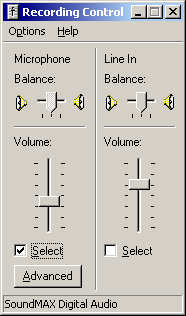
| There may be problem with your microphone. Please make sure that your microphone volume is turned up and not on mute. You can check this from the Control Panel of your PC. Be sure that you set recording control (not playback volume control).
|
| How can I control voice communication? |
There are more options for limit transmitted data and control cache size.You can use automatic voice detection, use full duplex or half duplex voice communication or manually mute your microphone. Click on microphone picture to manually change record and mute mode.In networks with long ping values you can increase jitter value in options, but with greater jitter values raise delay to listen opposite. Click on microphone picture to manually change record and mute mode.In networks with long ping values you can increase jitter value in options, but with greater jitter values raise delay to listen opposite. |
| Is text chat communication protected as voice communication? |
| If your connection is secured, your text chat is encrypted as your voice communication. There is no way decrypt transmitted textual data without correct password. |
| Can I decode encrypted IPi Phone communication without password? |
| NO, you can’t decrypt and decode IPi Phone communication without correct password. There is used encrypted file stream with AES algorithm with 160 bit key length. |
| How can I uninstall IPi Phone? |
| Open the Control Panel, select “Add/Remove programs” option, and double-click IPi Phone’s entry on the list. |
| I think I have found a bug. Where and how can I submit reports about found problems? |
| You can send a description about any problem you find to olej@aolej.com. Please check if you are using the latest version of program, problem may already be fixed at that time. When describing your problem, try to include used version, operating system and as much information as possible. |
| Can I make a suggestion for a new version? |
| Sure, new suggestions are welcome. You can send it to olej@aolej.com. |